
Always on Desktop Calendar for Windows 11 Users
Keeping track of meetings, calls, and deadlines on a busy Windows 11 desktop can be surprisingly complex. Browser tabs pile up, apps overlap, and the built-in calendar is often hidden away. Live Desk Cal solves this with a simple idea: keep your calendar always visible, right on your desktop.
Live Desk Cal is a lightweight, always-on-top desktop calendar explicitly designed for Windows 10 and Windows 11 users who want fast, seamless scheduling without clutter. It comes in three versions: Free, Lite, and Pro, so that you can choose between fully offline planning or rich sync with Google, Outlook, and even CRM tools.
Why an Always-on Desktop Calendar Matters
Most people rely on web calendars that stay buried behind other apps. Every time you want to check your day, you have to open a browser or switch to another program. That constant switching wastes time and breaks focus.
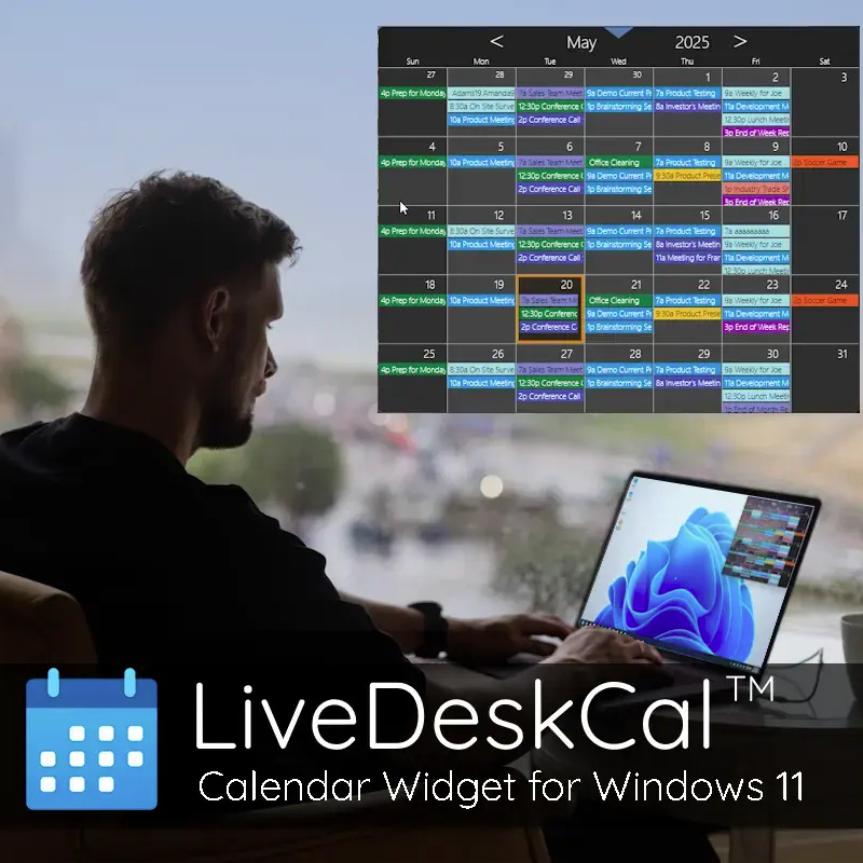
An always-on desktop calendar changes that. With Live Desk Cal, your schedule stays pinned to the top of other windows in a compact, resizable widget. You get instant awareness of what is coming next without leaving your current task. This is especially valuable if you work in sales, support, freelancing, or any role where meeting times and follow-ups are critical.
Key Features of Live Desk Cal
A desktop calendar that stays visible
Live Desk Cal places your calendar directly on the Windows desktop as a floating, resizable widget. You can keep it always on top or let it sit just above the wallpaper, depending on your preferences.
Free offline calendar with local control
The Free version of Live Desk Cal is ideal if you want a private local calendar without any cloud connection. It lets you:
Create and edit events directly on your desktop
Set custom alarms and reminders
Use color-coded categories
Run 100 percent offline, with no account required
Start automatically with Windows and lock settings to avoid accidental changes
All of your data stays on your PC, which is perfect for privacy-focused users.
Lite version with Google and Outlook sync
If you rely on cloud calendars, the Lite version adds the ability to:
Sync with Google Calendar and Outlook Online or Office 365
View and edit Google and Exchange events from the desktop
Refresh automatically so your schedule stays up to date
You still see everything in a single desktop view, but your changes are reflected in your online calendars.
Pro version with CRM integration
For serious business use, the Pro version connects to popular CRM platforms such as Act!, Outlook Classic, GoldMine, Monday.com, and Google. It offers two-way syncing with CRM systems for scheduling, making Live Desk Cal especially helpful for sales teams and account managers who need customer appointments and tasks in constant view.
Customisation and performance
Live Desk Cal is designed to be lightweight and fast. You can adjust layout, colours, categories, and views to match your workflow. It supports Windows 10 and Windows 11, high-DPI displays, and multi-monitor setups, so the widget can live exactly where it helps you most.
Benefits of Using Live Desk Cal
Less context switching, more focus
Because your calendar is already on the screen, you do not need to jump between apps to check the time of the next call. That reduces context switching and helps you stay in the flow of your current task.
Fewer missed meetings and deadlines.
Always-on visibility makes it much harder to overlook a scheduled event. With colour-coded entries and clear reminders, essential calls, renewals, and deadlines are more likely to happen on time, without last-minute scrambling.
Healthier, more predictable workdays
When your entire day is visible at a glance, it becomes easier to spot overload and adjust. You can spread meetings out, reserve focus blocks, and build a calmer routine instead of stacking everything into one stressful stretch.
Fits many different roles
Live Desk Cal works well for:
Remote workers who live inside multiple apps and video calls
Freelancers juggling clients across time zones
Students who want a simple planner on screen
Small business owners who need a shared view on office PCs
Sales and support teams that depend on CRM based schedules
Pricing and Versions
Live Desk Cal keeps pricing simple, with one-time licences instead of monthly subscriptions:
Free – local only calendar, offline, no account required
Lite – sync with Google and Outlook Online, with a low-cost lifetime licence
Pro – adds CRM and advanced integrations, with a higher-tier lifetime licence
All versions support Windows 10 and 11. Lite and Pro typically include a trial period so you can test cloud sync and integrations before buying.
Who Should Use Live Desk Cal?
If you are a Windows 11 user who wants your calendar to behave like a proper desktop tool rather than a hidden web page, Live Desk Cal is for you.
It is particularly valuable if you:
Prefer an offline, private schedule on your PC
Need your Google or Outlook events visible without opening a browser
Rely on CRM platforms and want calendar visibility tied to customer activity
Are you tired of heavy, cluttered apps and want a clear, reliable calendar widget
Conclusion
An always-on desktop calendar is one of the simplest upgrades you can make to your Windows 11 workflow. Live Desk Cal takes that idea and turns it into a polished, practical tool that respects your time and your privacy. With a free offline version, a cloud-synced Lite edition, and a CRM-enabled Pro tier, it scales from personal planning to serious business scheduling.
If you are ready to stop losing track of your day behind browser tabs and background windows, Live Desk Cal offers a clean, focused way to keep your schedule exactly where it belongs: always in sight on your desktop.